Guide
Rhythm Game Timing Windows: Why Faster Notes Feel Stricter
Learn what early and late mean in rhythm games, how timing windows work, why speed can shrink a pixel-based window, and how to test input lag.
Rhythm Game Timing Windows: Why Faster Notes Feel Stricter
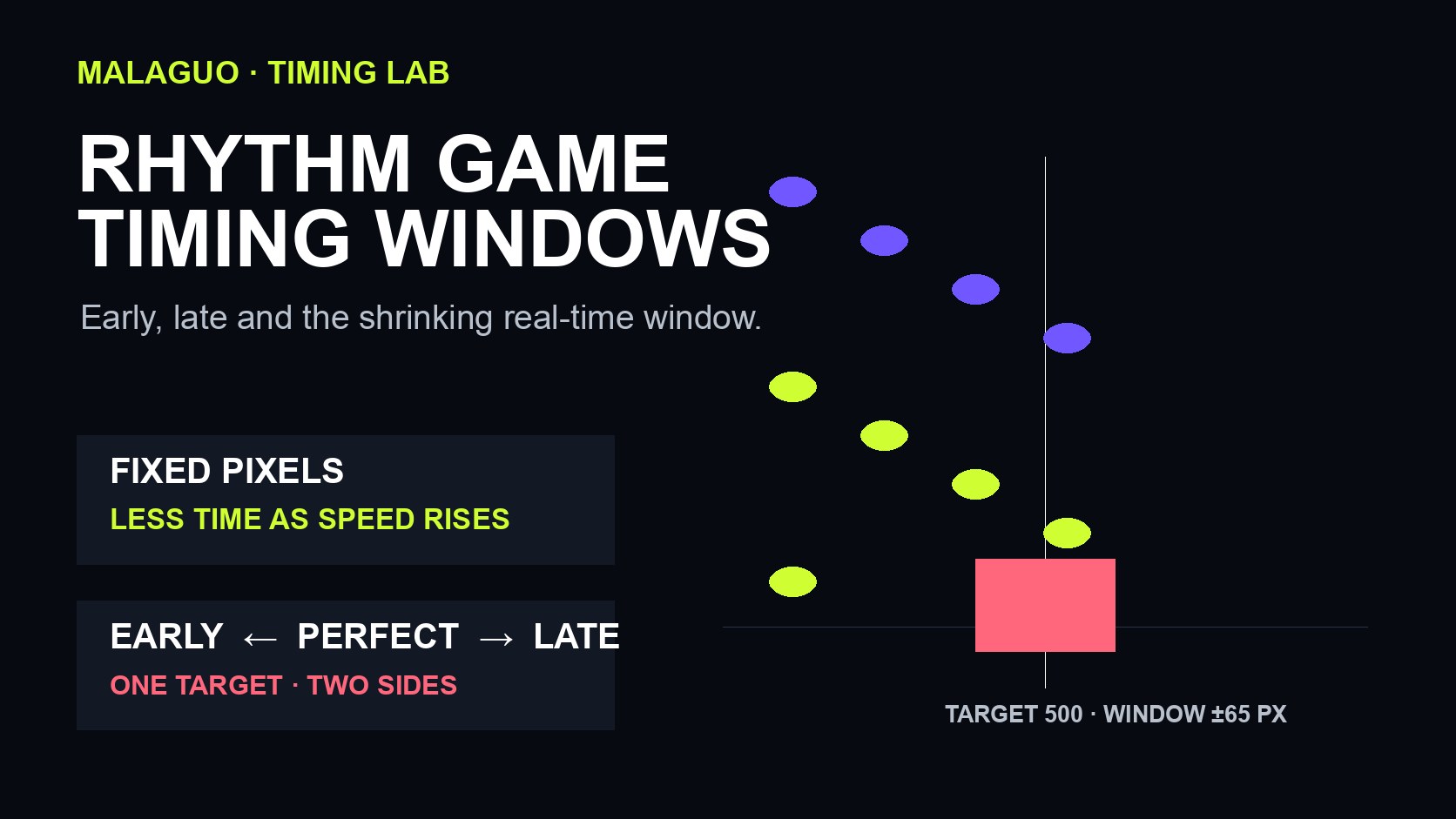
A rhythm-game timing window is the span before and after a target moment in which an input still counts as a hit. “Early” means the input arrived before the target; “late” means it arrived after. A faster-moving note does not automatically make the coded window smaller, but it can make the same pixel-based window represent fewer milliseconds—so the game genuinely becomes stricter in real time.
That difference matters in browser rhythm games. A lane may look unchanged while the notes accelerate. If the hit test measures distance from a judgment line, the allowed distance can stay fixed even as the time available to cross it shrinks.
What a timing window measures
Think of the target moment as zero. An input 40 milliseconds before it has a negative offset; an input 40 milliseconds after it has a positive offset. A simple game might accept every input from −100 ms through +100 ms, while a more detailed scoring system divides that range into tighter grades.
| Offset from target | Plain-language result | What it tells you |
|---|---|---|
| Negative | Early | You pressed before the note reached the target |
| Zero or near zero | Centered | Your input and the target moment were closely aligned |
| Positive | Late | You pressed after the note passed the target |
| Outside the accepted range | Miss | The input was too far from the target to count |
The exact numbers are game-specific. Do not copy a window from one title and assume it applies to another. Some games judge in milliseconds, some use frames, and some browser games compare on-screen position instead of storing a time offset directly.
A verified browser-game example
We inspected the active Malaguo build used by Geometry Pulse. Its notes move down a lane toward a target at vertical position 500. The build accepts a note only when its distance from that target is less than 65 pixels.
The note speed is not constant. It begins at 190 pixels per second and increases by 1.2 pixels per second for every second of elapsed play. That gives a useful conversion:
one-side timing window in seconds = 65 pixels ÷ current speed
The result is the allowed time on either side of the target, not the full early-to-late span.
| Elapsed play | Note speed | Accepted time on either side | Full early-to-late span |
|---|---|---|---|
| 0 seconds | 190 px/s | about 342 ms | about 684 ms |
| 30 seconds | 226 px/s | about 288 ms | about 575 ms |
| 60 seconds | 262 px/s | about 248 ms | about 496 ms |
The 65-pixel rule never changes, yet the real-time window contracts by about 94 ms on each side between the start and the 60-second mark. This is why the same judgment line feels less forgiving later in the run.
These values describe this tested Malaguo build, not a universal standard for rhythm games.
Why faster notes can feel stricter
There are two common systems:
- Time-based judgment. The game compares the input timestamp with the note timestamp. A ±100 ms window remains ±100 ms even if the visual scroll speed changes.
- Position-based judgment. The game compares the note's screen position with the judgment line. If speed rises while the accepted pixel distance stays fixed, the time window becomes smaller.
Geometry Pulse uses the second pattern. At 190 px/s, a note takes about 5.26 ms to travel one pixel. At 262 px/s, it takes about 3.82 ms. The same 65-pixel zone therefore passes under the target faster.
Visual speed can still affect a time-based game because it changes how long you can read a pattern. But that is a reading challenge, not necessarily a smaller coded judgment window. Separate the two before deciding that a game is inconsistent.
How scoring changes inside the accepted window
The tested build also reduces the awarded note score as the note moves away from the center. Its per-note formula is:
score = max(50, 130 − floor(distance from target in pixels))
Because a hit requires a distance smaller than 65 pixels, a valid note scores from roughly 66 points near the accepted edge up to 130 points at the center. A press can therefore count without being equally accurate.
| Distance from target | Accepted? | Note score |
|---|---|---|
| 0 px | Yes | 130 |
| 20 px | Yes | 110 |
| 40 px | Yes | 90 |
| 64 px | Yes | 66 |
| 65 px or more | No | Miss |
This produces two different goals: survive by staying inside the outer window, then improve accuracy by moving closer to the center.
How to tell whether you are early or late
A score alone does not identify the side of the error. Use a short repeatable test instead:
- Choose one lane and ignore score for several notes.
- Deliberately press while the note is still visibly above the target. Record whether it hits or misses.
- Deliberately press just after the note crosses the target. Compare the result.
- Move both presses toward the center in small steps.
- Repeat later in the run after speed has increased.
If both early and late presses become harder at the same rate, the window is probably narrowing symmetrically. If one side fails much sooner, the game or your setup may have an offset. The tested build uses a symmetric distance check around the target, so persistent one-sided errors are more likely to come from anticipation, display/audio alignment, or input delivery than from an intentionally lopsided rule.
Input lag and timing windows are different problems
Input lag shifts when the game receives your press. A timing window defines how far from the target the received press may be. Calibration, when a game provides it, moves the comparison point to compensate for a consistent shift; it does not make the keyboard, touchscreen, display, or speakers physically respond faster.
Before blaming the judgment window:
- close heavy tabs that make animation stutter;
- avoid Bluetooth audio while testing, because audio delay can move the beat you hear;
- test keyboard and touch separately rather than mixing their results;
- keep the same browser zoom and display refresh conditions;
- compare several notes, not one miss.
Geometry Pulse does not expose a user calibration control in the tested build. The practical response is to use the visual target as the reference, play on a stable device, and look for a repeated early-or-late pattern rather than trying to correct every individual note.
A three-run practice method
Use three short runs to separate reading, accuracy and speed.
Run 1: find the center
Watch the judgment line, not the top of the lane. Press when the note overlaps the target. Ignore combo and learn what a centered hit looks like.
Run 2: measure your bias
Notice whether your misses happen while notes are still above the line or already below it. If you are consistently early, wait for more overlap. If consistently late, move attention lower in the lane and prepare the finger sooner.
Run 3: hold the method as speed rises
Keep the same visual aim point. Do not gradually press farther ahead merely because notes move faster. The read time shrinks, but the target remains in the same place.
You can run the test in Geometry Pulse, then compare the feel with Single Stroke Beat. The free rhythm games collection lists more browser-playable options without a download.
Common mistakes
Treating every miss as lag. A random miss may be a reading or lane-selection error. Lag usually creates a repeatable bias.
Confusing scroll speed with note timing. A faster visual approach may reduce reading time even when a game uses a fixed millisecond window.
Using only the final score. Total score mixes accuracy, misses and survival. Inspect individual hits or repeat one lane.
Correcting too much after one late hit. Large back-and-forth corrections create alternating early and late errors. Adjust in small, consistent steps.
Assuming every browser and device behaves identically. Audio paths, touch sampling, frame scheduling and background load can change the received timing.
Practical recommendations
- Aim at one stable visual point instead of chasing the moving note.
- Use wired or device speakers when diagnosing audio delay.
- Practice at the beginning of a run before judging the accelerated section.
- Compare a batch of at least ten notes before changing technique.
- Treat repeated early/late direction as evidence; treat a single miss as noise.
- When a game has calibration, calibrate on the device you will actually use.
Frequently asked questions
What is a timing window in a rhythm game?
It is the accepted interval before and after a note's target moment. Inputs inside it receive a hit judgment; inputs outside it miss.
Does faster note speed make the timing window smaller?
Not always. In a time-based system the millisecond window can stay fixed. In a position-based system, a fixed pixel window becomes shorter in time as note speed increases.
What do early and late mean?
Early means the input arrived before the target moment. Late means it arrived after the target moment.
Can calibration remove input lag?
Calibration can offset a consistent delay in the judgment calculation. It cannot make the hardware respond faster or repair unstable frame timing.
Why did my hit count but receive fewer points?
Many games use a broad accepted window with higher scores near the center. In the tested Geometry Pulse build, accepted hits score less as their pixel distance from the target increases.